

Create your first project
A project holds the tests for one product — usually one website or app. Each project has a website address and folders with your tests in them.Steps
1
Sign up
Go to testbrick.com and create a free account. A short welcome guide helps you make your first project.
2
Create a project
Open the project menu at the top left and click Create New Project. Enter:
- Project name — for example, “My Store”
-
Base URL — the address of the app you’re testing, for example
https://mystore.com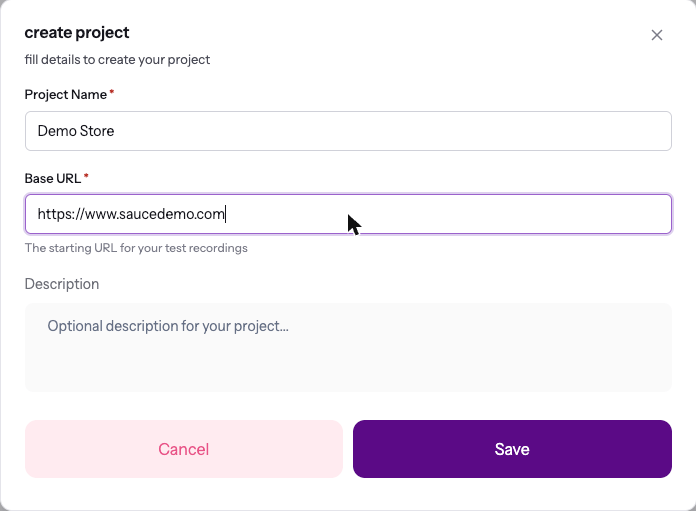
3
Create a folder
In the left sidebar, click + next to Folders to group your tests — for example “Checkout”, “Sign up” or “API”.
4
Create a test
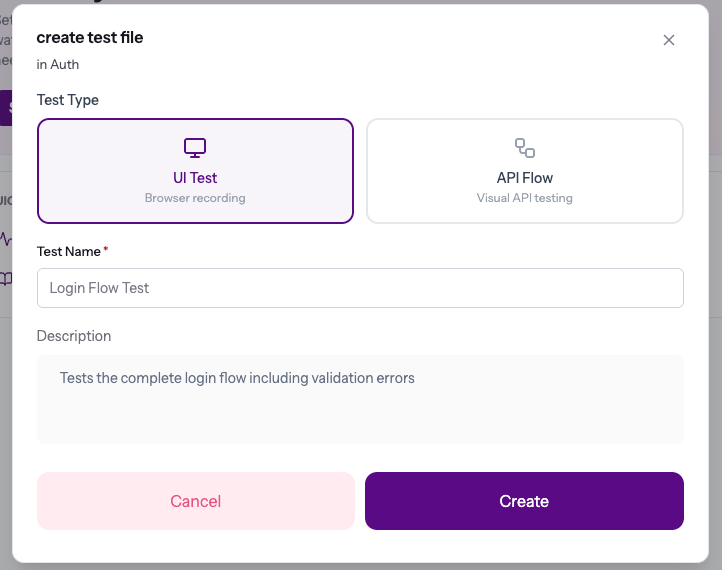
Inside a folder, click Add Test File and pick:
- UI Test — a test that runs in a real browser
-
API Flow — a chain of API requests on a canvas
Switching between projects
The project menu at the top left shows the projects you used most recently, with a search box when you have more than five. Click View all projects to see every project on one page — with how many tests each has, its monitors and when it last ran. Pick a project there to switch to it, or use the pencil and bin icons to rename or delete one.When you switch projects while a test is open, TestBrick takes you to the new project’s home, so you never look at one project’s test under another project’s name.
How a project is organized
UI tests and API flows can live in the same folder. The sidebar shows a different icon for each.