

Monitors
A monitor runs a group of tests on a schedule — every few minutes, hourly or daily — and tells you when one breaks and when it’s fixed. Browser tests and API flows can share one monitor. Open Monitors at the top of the dashboard to see every monitor in the project, how healthy each one is, and the project’s uptime over the last 7 days.Create a monitor
1
Pick the tests
Click New monitor and tick the tests it should run. Select all in folder picks a whole folder at once.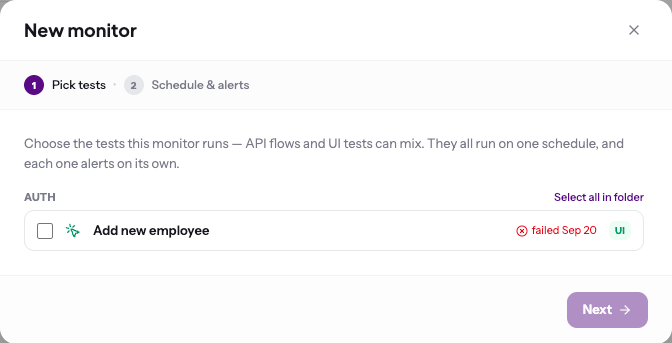
2
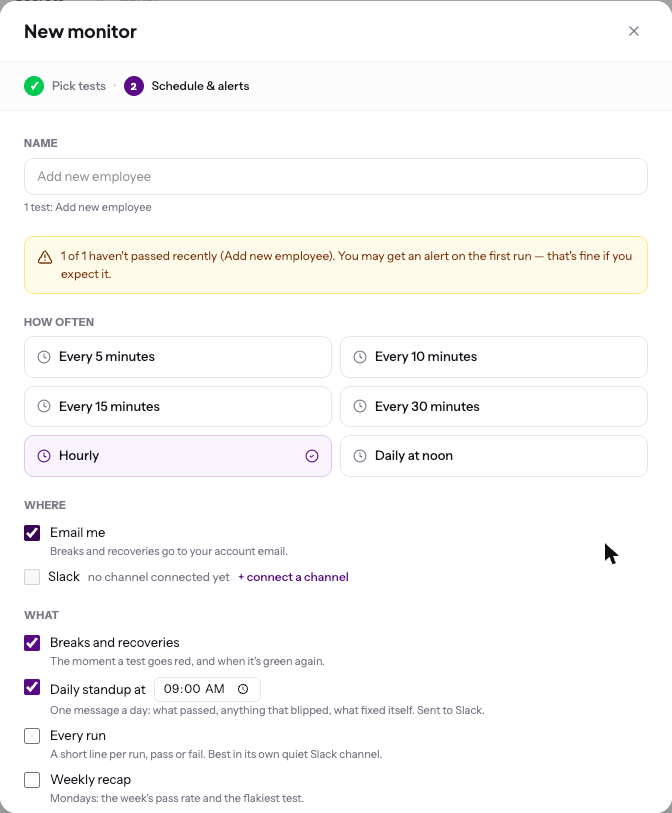
Choose how often and who hears about it
- How often — every 5, 10, 15 or 30 minutes, hourly, or daily at noon. How often you can run depends on your plan.
- Where — email (to your account address) and, if connected, a Slack channel
-
What — which messages to send (see below)
3
Turn monitoring on
Click Turn monitoring on. The first run starts on the next scheduled time.
What you’re told
Every alert links to the failed run, which opens with why it failed.